GoodNotes Covers: Elevate Your Digital Notebooks with Style and Functionality
For professionals, students, and creative thinkers, digital note-taking apps like GoodNotes have become essential tools for organizing ideas, managing tasks, and staying productive. However, the visual appeal of your digital notebooks can often be overlooked. This is where GoodNotes Covers come into play—offering a stylish and practical way to enhance your digital bookshelves while improving usability and personalization.
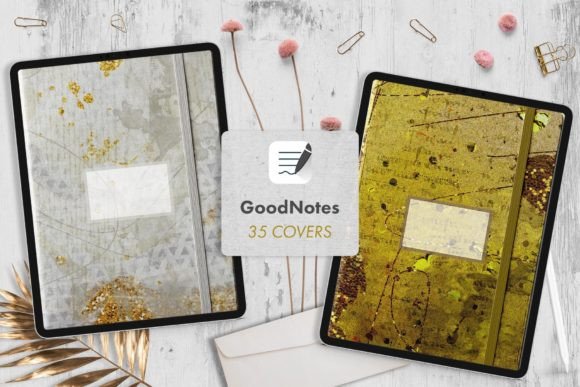
Whether you're an entrepreneur, educator, or hobbyist, having a well-organized and visually appealing digital workspace can make a significant difference in how you interact with your notes. With a set of 35 high-quality covers designed specifically for the GoodNotes iPad A4 portrait template, these digital notebook covers provide both aesthetic value and functional benefits.
What Are GoodNotes Covers and Why Do They Matter?
GoodNotes Covers are digital files that act as front pages for your notes in the GoodNotes app. These covers are more than just decorative—they help you identify different notebooks at a glance, organize your digital library, and add a personal touch to your workflow. The set includes a mix of patterned designs, simple textures, and rich finishes, giving you options to match your style or the purpose of each notebook.
Each cover is optimized for the A4 portrait size, ensuring it fits perfectly within the GoodNotes template. The high-resolution .jpg files (150 dpi) maintain clarity and detail, making them ideal for importing into any compatible note-taking app that supports JPG files.
Common Mistakes When Using GoodNotes Covers
While GoodNotes Covers are a great addition to your digital toolkit, there are several common mistakes users make that can affect their effectiveness and satisfaction. One of the most frequent errors is not checking the compatibility of the cover format with their specific app. Although these covers work with most apps that support JPG files, some may require additional steps to import or adjust the size.
Another mistake is overlooking the importance of customization. Many users download a cover and use it without adding personal details, such as a title or label. This can lead to confusion when managing multiple notebooks, especially if they look similar. For example, if you have several covers with similar patterns, it’s easy to misidentify a notebook without a clear title.
How to Customize Your GoodNotes Covers for Better Organization
Customizing your GoodNotes Covers is simple and can significantly improve your workflow. Start by selecting an untitled cover and using the GoodNotes Text tool to add a title. You can choose from a variety of fonts or even use your Apple Pencil to write the title in your own handwriting. This adds a personal touch and makes it easier to recognize each notebook at a glance.
Consider creating a naming convention that works for you. For instance, you might label your business notebooks with “Business – Q3” or your personal journal as “Journal – 2024.” This approach helps keep your digital library organized and efficient, especially if you use multiple apps or devices.
Key Considerations Before Choosing GoodNotes Covers
Before purchasing or downloading a set of GoodNotes Covers, there are a few important factors to consider. First, ensure that the covers are optimized for the A4 portrait template. While many digital covers are designed for standard sizes, not all will fit perfectly in GoodNotes, which could result in misalignment or extra space around the edges.
Also, think about the type of design you prefer. Some users may want bold patterns for creative projects, while others may prefer minimalist textures for professional or academic use. Having a variety of options allows you to tailor your digital notebooks to your needs and preferences.
Finally, check the file format and resolution. The covers included in this set are .jpg files at 150 dpi, which is suitable for most apps. However, if you’re using a different app or device, verify that it supports this format and resolution to avoid quality issues.
Practical Tips for Getting the Most Out of Your GoodNotes Covers
To maximize the value of your GoodNotes Covers, start by organizing them into folders or categories based on their purpose. For example, you might create a folder for “Work,” another for “Personal,” and a third for “Creative Projects.” This helps streamline your workflow and ensures you can quickly access the right cover for each notebook.
Additionally, take advantage of the reusable nature of these covers. If you find that a particular design isn’t working for your needs, you can always replace it with a different one. This flexibility allows you to experiment with styles and find what works best for your workflow.
Why GoodNotes Covers Are a Smart Investment
Investing in a set of GoodNotes Covers is more than just a minor upgrade—it’s a way to enhance your digital experience and improve your productivity. By choosing the right covers, you can create a more organized, visually appealing, and personalized workspace that reflects your unique style and needs.
Whether you’re a student, a professional, or a creative thinker, these covers offer a practical solution for improving your note-taking process. With 35 high-quality options to choose from, you’ll have the flexibility to match your notebooks to your goals, mood, or project requirements.